Documentation
An Icon component for Experience Cloud, featuring over 13,000 icons that can be easily configured from Experience Builder!
Icon for Experience Cloud
As of: Winter '25
Authored By: George Abboud
Last Updated: 10/10/2024

Description
An Icon component for Experience Cloud, featuring over 13,000 icons that can be easily configured from Experience Builder!
This component features icons from libraries that include SLDS, Font Awesome, and Google Fonts. You can configure the size, alignment, and padding by form-factor. Additionally you can configure icon color, background color, and border size, color, and shape!
Disclaimer:
This package is free to use, but is not an official salesforce.com product, and should be considered a community project. The functionality is not officially tested or documented, and does not come with any support, warrantees, or updates. It is offered as-is.
AppExchange Listing URL
https://appexchange.salesforce.com/appxListingDetail?listingId=7c805845-e7de-4a86-96db-c8d9854e0dd2
Open-Source Code
https://github.com/salesforce-experiencecloud/ecicon
Demo Video
Usage and Configuration
Using the Icon component is pretty easy! Just follow these steps:
Install the package in your org
Go to your site’s Experience Builder
Add the following markup to your site’s Head Markup by going to Settings → Advanced → Edit Head Markup
For LWR Sites:<!-- ecicon fonts --><link rel="preload" href="{ basePath }/sfsites/c/resource/ecicon__fontawesome/webfonts/fa-brands-400.woff2" as="font" type="font/woff2" crossorigin="anonymous" fetchPriority="low"/><link rel="preload" href="{ basePath }/sfsites/c/resource/ecicon__fontawesome/webfonts/fa-regular-400.woff2" as="font" type="font/woff2" crossorigin="anonymous" fetchPriority="low"/><link rel="preload" href="{ basePath }/sfsites/c/resource/ecicon__fontawesome/webfonts/fa-solid-900.woff2" as="font" type="font/woff2" crossorigin="anonymous" fetchPriority="low"/><link rel="preload" href="{ basePath }/sfsites/c/resource/ecicon__googlefontsoutlined/webfonts/MaterialSymbolsOutlined.woff2" as="font" type="font/woff2" crossorigin="anonymous" fetchPriority="low"/><link rel="preload" href="{ basePath }/sfsites/c/resource/ecicon__googlefontsrounded/webfonts/MaterialSymbolsRounded.woff2" as="font" type="font/woff2" crossorigin="anonymous" fetchPriority="low"/><link rel="preload" href="{ basePath }/sfsites/c/resource/ecicon__googlefontssharp/webfonts/MaterialSymbolsSharp.woff2" as="font" type="font/woff2" crossorigin="anonymous" fetchPriority="low"/><!-- ecicon stylesheets --><link rel="stylesheet" href="{ basePath }/sfsites/c/resource/ecicon__fontawesome/css/brands.min.css?{ versionKey }" /><link rel="stylesheet" href="{ basePath }/sfsites/c/resource/ecicon__fontawesome/css/regular.min.css?{ versionKey }" /><link rel="stylesheet" href="{ basePath }/sfsites/c/resource/ecicon__fontawesome/css/solid.min.css?{ versionKey }" /><link rel="stylesheet" href="{ basePath }/sfsites/c/resource/ecicon__fontawesome/css/fontawesome.min.css?{ versionKey }" /><link rel="stylesheet" href="{ basePath }/sfsites/c/resource/ecicon__googlefontsoutlined/css/MaterialSymbolsOutlined.css?{ versionKey }" /><link rel="stylesheet" href="{ basePath }/sfsites/c/resource/ecicon__googlefontsrounded/css/MaterialSymbolsRounded.css?{ versionKey }" /><link rel="stylesheet" href="{ basePath }/sfsites/c/resource/ecicon__googlefontssharp/css/MaterialSymbolsSharp.css?{ versionKey }" />
For Aura Sites:<!-- ecicon fonts --><link rel="preload" href="/sfsites/c/resource/ecicon__fontawesome/webfonts/fa-brands-400.woff2" as="font" type="font/woff2" crossorigin="anonymous" fetchPriority="low"/><link rel="preload" href="/sfsites/c/resource/ecicon__fontawesome/webfonts/fa-regular-400.woff2" as="font" type="font/woff2" crossorigin="anonymous" fetchPriority="low"/><link rel="preload" href="/sfsites/c/resource/ecicon__fontawesome/webfonts/fa-solid-900.woff2" as="font" type="font/woff2" crossorigin="anonymous" fetchPriority="low"/><link rel="preload" href="/sfsites/c/resource/ecicon__googlefontsoutlined/webfonts/MaterialSymbolsOutlined.woff2" as="font" type="font/woff2" crossorigin="anonymous" fetchPriority="low"/><link rel="preload" href="/sfsites/c/resource/ecicon__googlefontsrounded/webfonts/MaterialSymbolsRounded.woff2" as="font" type="font/woff2" crossorigin="anonymous" fetchPriority="low"/><link rel="preload" href="/sfsites/c/resource/ecicon__googlefontssharp/webfonts/MaterialSymbolsSharp.woff2" as="font" type="font/woff2" crossorigin="anonymous" fetchPriority="low"/><!-- ecicon stylesheets --><link rel="stylesheet" href="/sfsites/c/resource/ecicon__fontawesome/css/brands.min.css" /><link rel="stylesheet" href="/sfsites/c/resource/ecicon__fontawesome/css/regular.min.css" /><link rel="stylesheet" href="/sfsites/c/resource/ecicon__fontawesome/css/solid.min.css" /><link rel="stylesheet" href="/sfsites/c/resource/ecicon__fontawesome/css/fontawesome.min.css" /><link rel="stylesheet" href="/sfsites/c/resource/ecicon__googlefontsoutlined/css/MaterialSymbolsOutlined.css" /><link rel="stylesheet" href="/sfsites/c/resource/ecicon__googlefontsrounded/css/MaterialSymbolsRounded.css" /><link rel="stylesheet" href="/sfsites/c/resource/ecicon__googlefontssharp/css/MaterialSymbolsSharp.css" />Drag and Drop the Icon for Experience Cloud component from the component panel, anywhere you want to use it on the site.
From the property panel, search and select an icon, then configure the icon size, colors, borders, rotation, and various other styles!
That’s it! Make sure you publish your site and you should be able to see it in action!
Can I use the icons within other components?
You can use Font Awesome and Google Font icons with just markup, but not SLDS Icons 😞). This is because SLDS icons are SVG based, whereas the other libraries are font / CSS based.
As long as you’ve included the required Head Markup, you can use the libraries’ respective markup within any component that accepts HTML input (like the HTML Editor component) or custom LWCs where you can include the markup in your .html template.
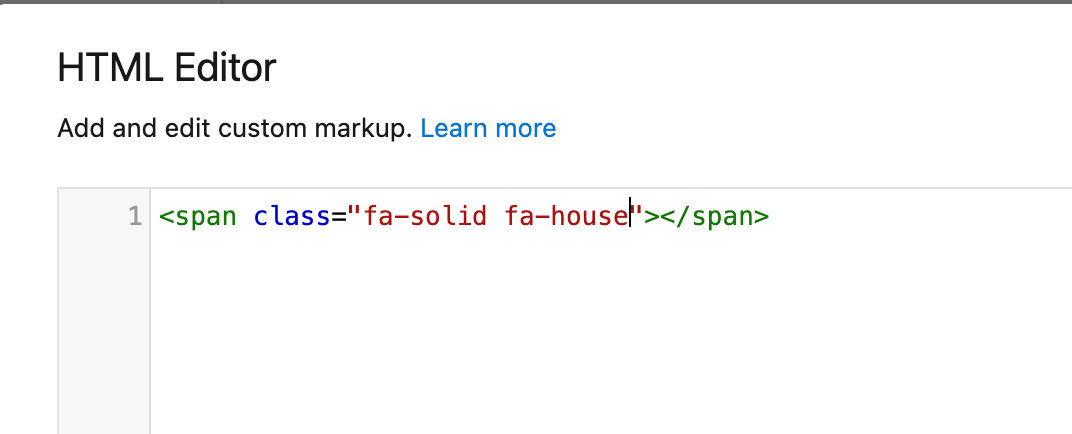
Here is an example:
This is markup inside the OOTB HTML Editor.
<span class="fa-solid fa-house"></span>